
Home, workspaces, and connections
The home screen is the entry point for every saved resource. Workspaces group connections, while unified grid and tree views, search, and ordering make large sets easier to navigate. Organizing a connection does not change the remote service itself. Since v0.19.0 the connection-form field for choosing the owning group is consistently labeled "Group" — the same concept as a home-screen workspace.
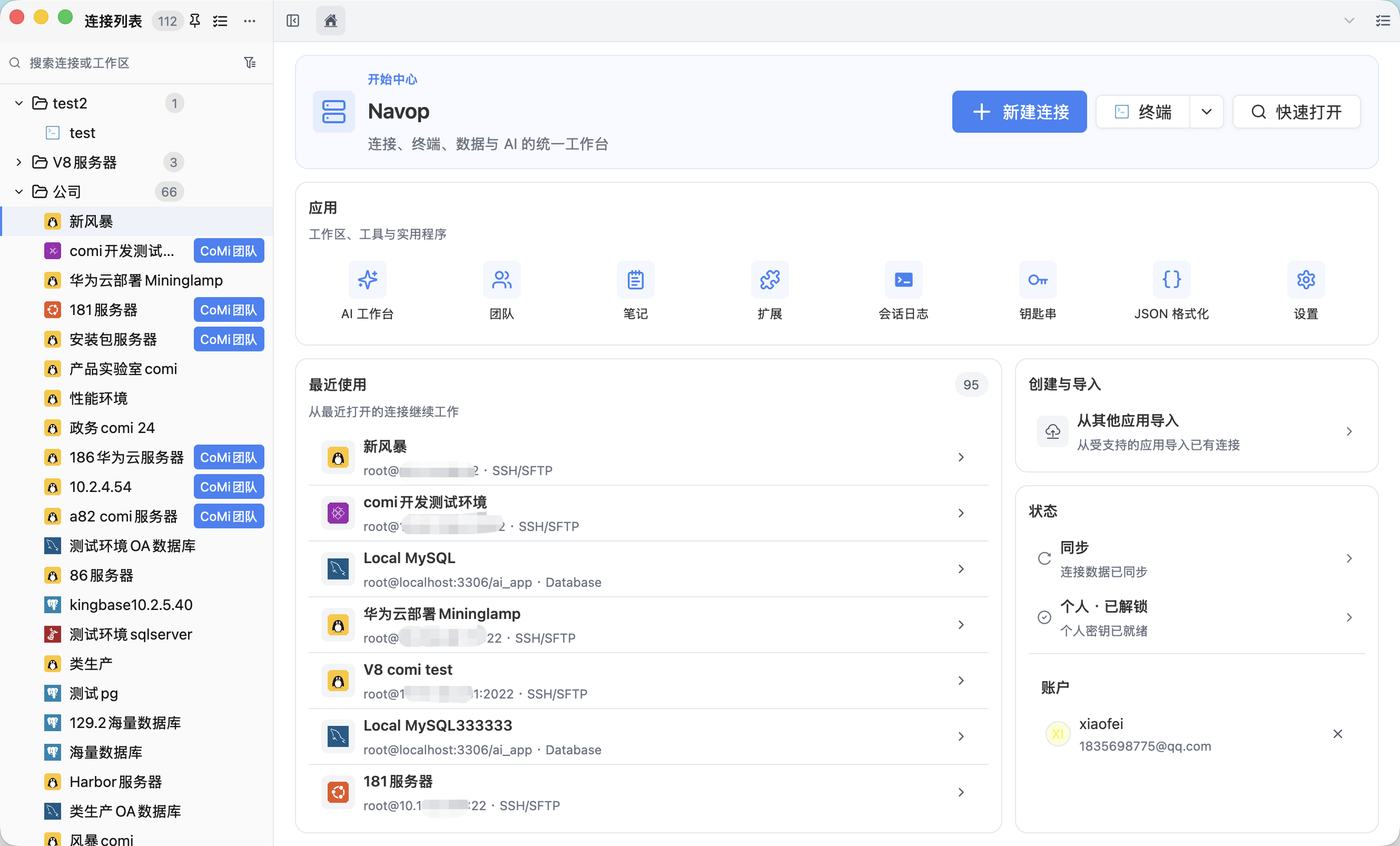
Organize the home screen
The home dashboard keeps recent connections beside New Connection, Terminal, Quick Open, sync, import, Notes, AI workbench, and extension shortcuts. Search by connection name or type and switch between grid and tree layouts. Create workspaces for production, staging, local development, customers, or projects; edit their names, drag to reorder (order persists across reloads), filter the visible connections, and use batch mode to move or delete multiple connections at once. Use unmistakable names and visual cues for production resources.
The connection list order is configurable under Settings → General → Connection Display: it defaults to natural name order (numeric segments such as IP addresses compared by value, case-insensitive) and can be switched to "Most Recently Used" (LRU). The setting applies to the Home connection list, Redis/MongoDB workspace tabs, and the persistent sidebar connection tree, taking effect immediately.
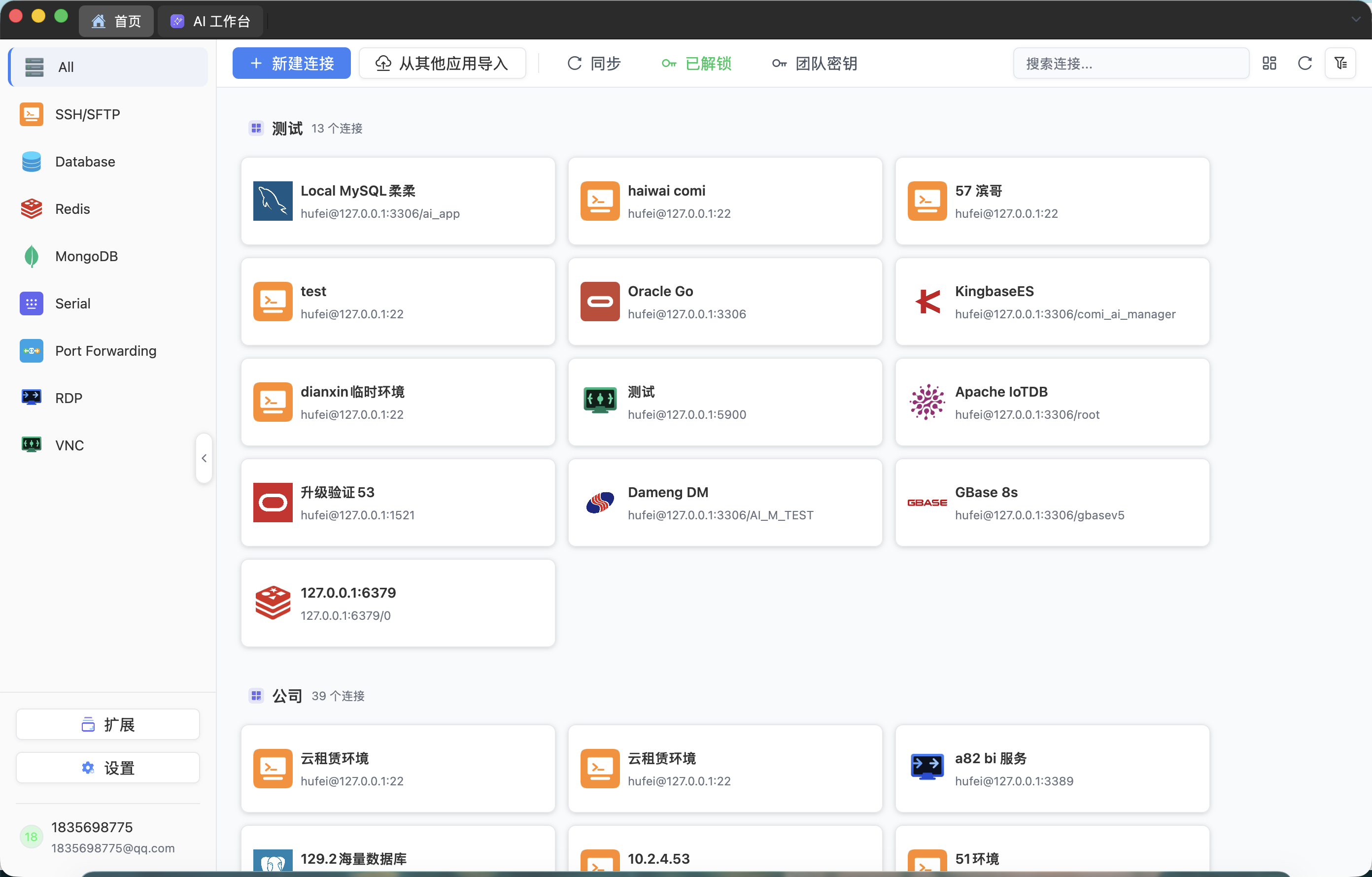
The connection tree opens as a floating panel and no longer squeezes or pushes the terminal or tab bar when expanded, and clicking a connection does not accidentally collapse the sidebar. Clicking non-connection areas such as Settings, Extensions, or the AI Workbench collapses the tree automatically; you can also pin the tree as a persistent sidebar while other tabs are open. Use it to search, expand or collapse workspace groups, resize the navigation area, and move quickly between resources. A single click selects or focuses a home card or sidebar row; a double-click opens the connection directly. Before sharing a screen, review any visible hostnames, accounts, team labels, and internal addresses.
Before deleting a workspace, review what happens to its saved entries. A workspace is an organizational layer, but removing or moving entries can still affect local navigation and sync state.
Create, edit, copy, and delete
New Connection includes databases, Redis, MongoDB, SSH/SFTP, local Terminal, RDP, VNC, Serial, Port Forwarding, and additional extension-provided types. Fill in authentication and advanced settings, test the connection, then save it.
Existing connections can be edited, copied, or deleted. A copy is useful for a related environment, but change its name, destination, and credentials immediately. Close tabs, terminals, transfers, and forwards that use a connection before editing or deleting it.
Search, quick open, and ad-hoc SSH
Search changes only what is displayed. Quick Open (from the tab bar) also supports ad-hoc SSH connections: enter a host, port, and credentials to open a one-off session without creating a saved connection — ideal for troubleshooting an unfamiliar server. Cards work well for a smaller set of recognizable resources, while list views make dense browsing and ordering easier; double-click the reviewed target to open it. Closing a database or terminal tab does not delete the saved connection. Periodically remove obsolete entries, normalize names, and confirm workspace membership. Never put a password or token in a connection name; hostnames and internal addresses may also require redaction in screenshots.
Duplicating a tab automatically appends a number that reuses freed slots (e.g. 192.168.1.1 → 192.168.1.1(1)), and tab widths adapt to content so long titles are not truncated.
Deleting a saved entry normally does not delete a remote database or server. Operations performed inside the opened workspace, however, can change real remote data.
Import from other applications
Connection import requires an importer extension. It can scan supported local applications (such as SecureCRT sessions and quick commands) or read an exported file, then show a preview before anything is saved. Database and SSH records are labeled to indicate whether passwords were imported, missing, unsupported, or blocked by permissions.
Select only reviewed records. Duplicate detection skips obvious repeats, but you must still compare names, hosts, ports, databases, and authentication methods. Some sources cannot export secrets, so re-enter them after import. Port-forward import, saving, and duplicate handling may not be supported and should be rebuilt manually.
Handle sync consequences
With personal or team sync enabled, deleting or editing a connection can produce a cross-device change or conflict. Compare timestamps and fields before choosing the local or remote version. Do not assume one side is automatically newer or safer.
Keep the distinction between connection metadata and remote resources clear. Syncing or deleting an entry changes access configuration; SQL, key deletion, file overwrite, and other in-workspace actions affect the actual target.